Image to Cartoon in 3D, Anime or Comic Style
Upload a photo of you or your pet, and the image to cartoon editor makes it 3D, anime, comic or a felt doll.
JPG, PNG or WebP, up to 10 MB each
Examples
Start from a real image to cartoon result
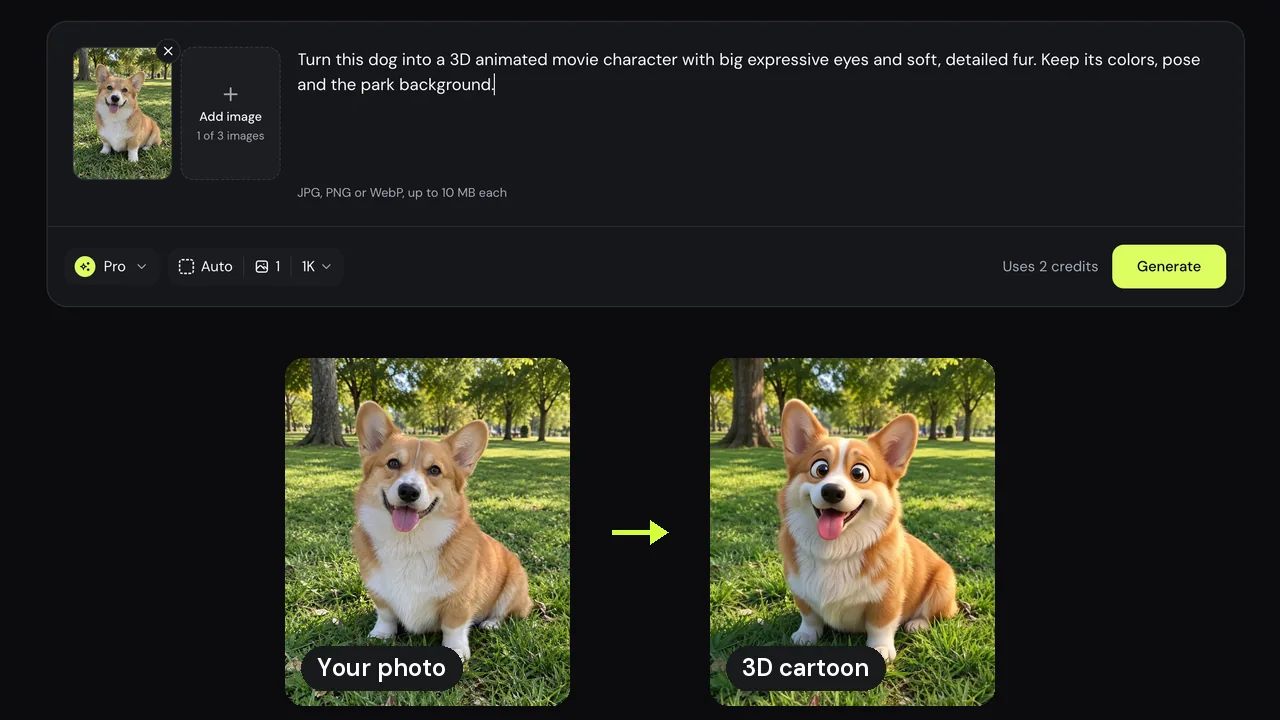
All three cards are real image to cartoon results from this editor. 3D Cartoon Pet loads the corgi photo and its prompt; Anime Portrait and Plush Toy show two more looks.
Want a painting instead? Try picture to painting. For flat anime art see photo to anime, or open the image to image editor for any other style.
How it works
Image to cartoon in 3 steps
The image to cartoon editor needs one clear photo and one sentence about the cartoon you want.
Upload a clear photo
A sharp face or pet in daylight gives the image to cartoon result clean lines. JPG, PNG or WebP up to 10 MB.
Pick a cartoon style
Load 3D Cartoon Pet, Anime Portrait or Plush Toy, or name your own style, then add keep the colors and pose.
Generate and download
Pro took 25 to 44 seconds in our tests. Drag the slider to compare, then download or press Try again.
Results
What our image to cartoon tests changed
Four real image to cartoon results from this editor, measured against their original photos.
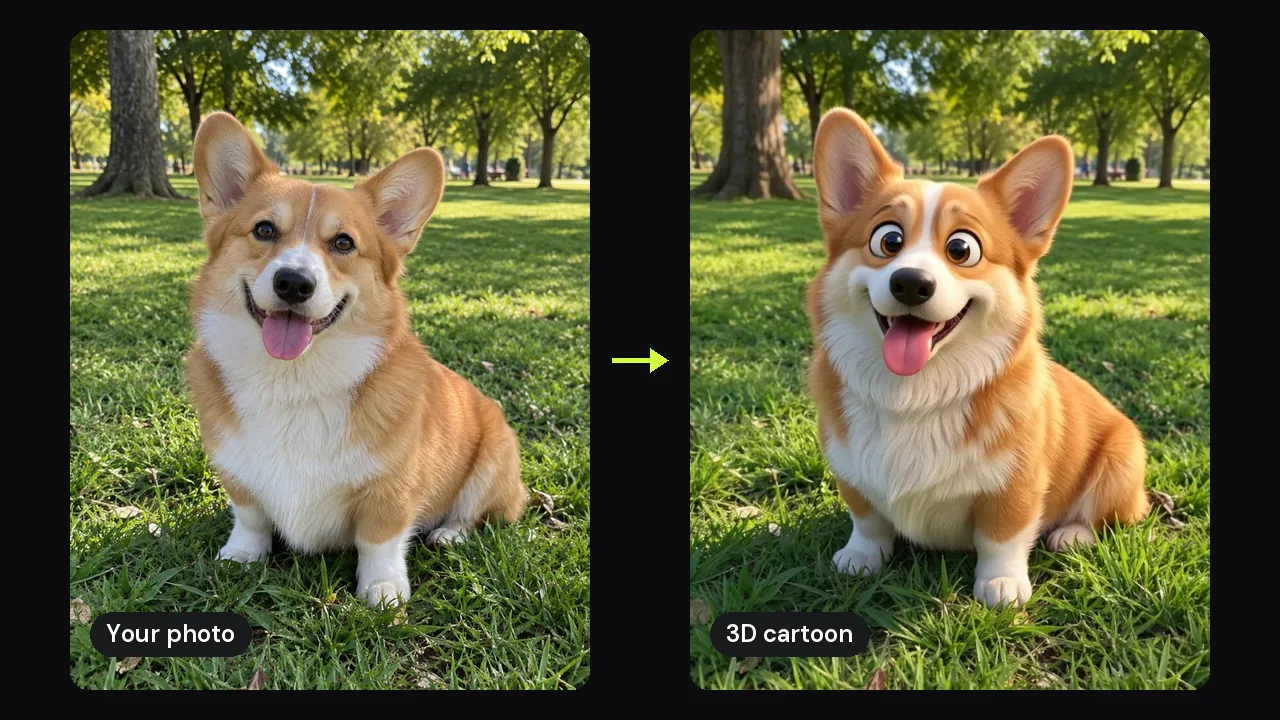
A corgi becomes a 3D movie character
Our test photo was a corgi sitting in a sunny park. One Pro image to cartoon run kept its orange and white coat, the open mouth and the park, and turned it into an animated movie character. Strongly colored pixels rose from 43% to 62% of the frame.
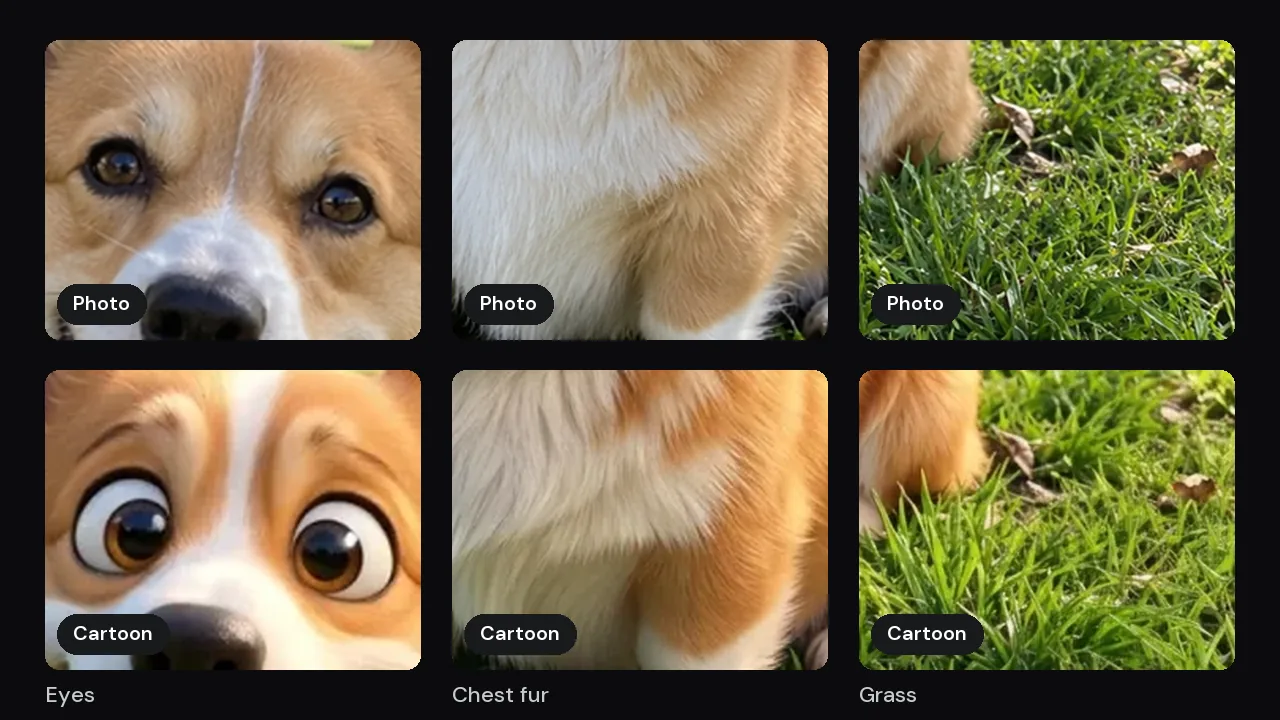
Bigger eyes, smoother fur
Up close, the eyes grew about 40% wider, from roughly 30 to 42 pixels in an 800-pixel image, with white showing around the iris. Fur and grass lost fine texture: edge pixels fell from 15.8% to 9.4%. The ears, nose and markings kept their shape in the image to cartoon result.
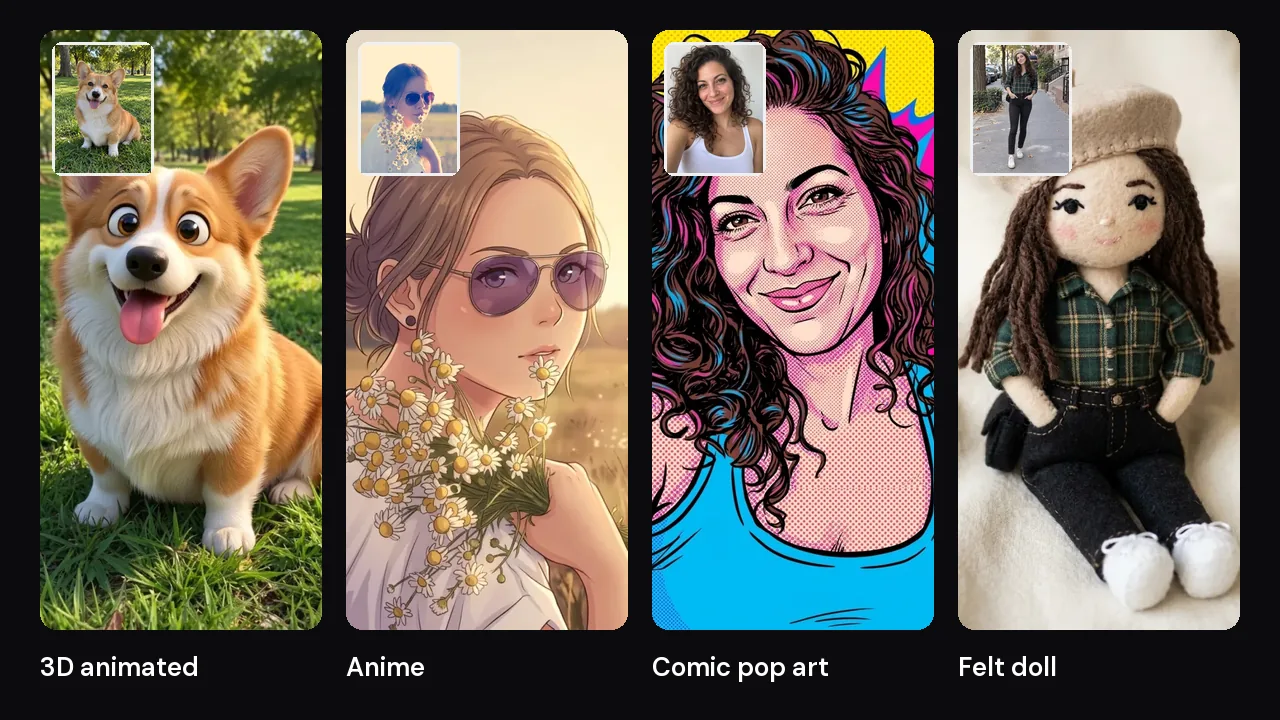
Four cartoon styles from real runs
3D animated, anime, comic pop art and a felt doll, each from a different test photo. The anime run kept the aviator sunglasses and daisies; the doll kept the plaid shirt, black jeans and beret. Choose the image to cartoon style first, then the photo.
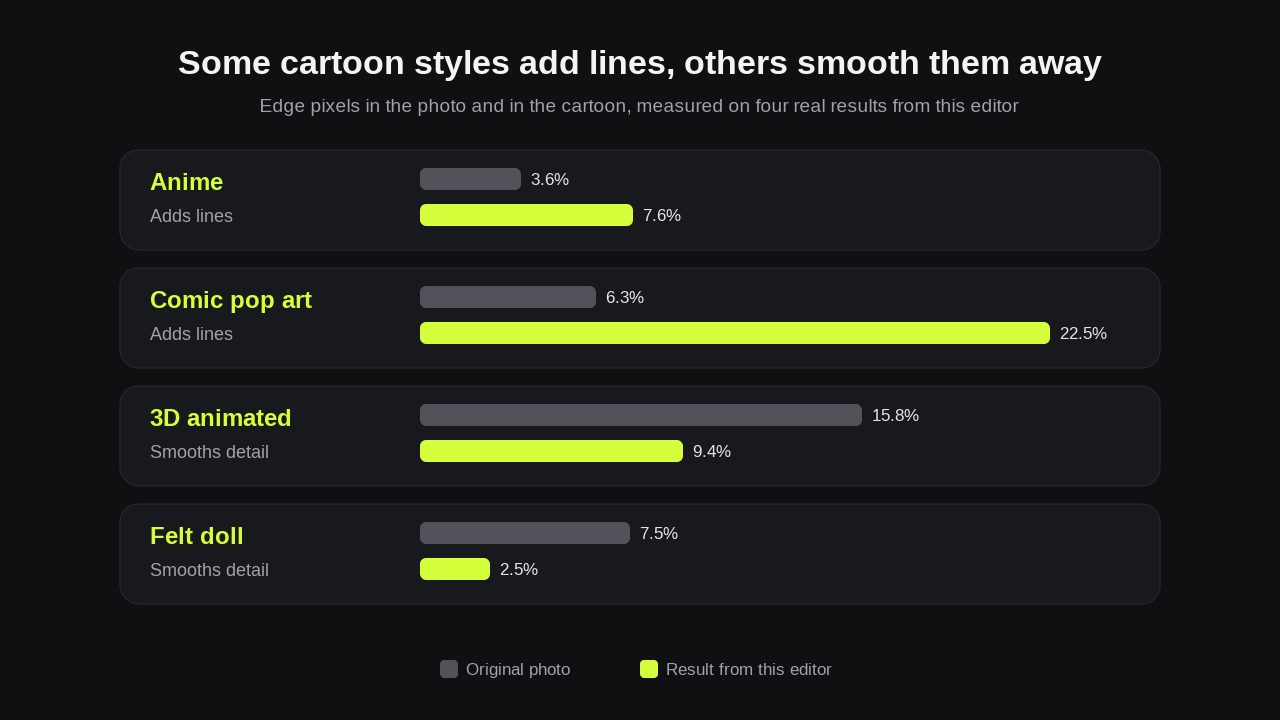
Some styles add lines, some smooth them
We counted edge pixels before and after. Anime went from 3.6% to 7.6% and comic pop art from 6.3% to 22.5%, because both draw ink outlines. 3D and the felt doll did the opposite, falling to 9.4% and 2.5%. For crisp image to cartoon lines, choose anime or comic; for soft and round, 3D or doll.
Load a template, swap in your photo
Every card loads a real photo and its prompt into the image to cartoon editor. Replace the photo with yours, keep the line about colors and pose, and press Generate.
Prompts
Cartoon yourself: image to cartoon prompts to try
Paste one into the image to cartoon editor. The anime and doll prompts are close to the ones we ran; the others are starting points.
3D movie character
Turn this photo into a 3D animated movie character with big expressive eyes and soft skin. Keep the hair, clothes and background.
Anime
Turn this photo into a clean anime illustration. Keep the same person, pose and background.
Comic book
Turn this photo into a comic book cartoon with thick ink outlines, halftone dots and flat colors. Keep the face.
Felt doll
Turn the person into a cute handmade plush doll with felt clothes and stitched details. Keep the outfit.
Tips
Tips to cartoonize a photo well
The image to cartoon editor redraws what it can see. To cartoonize photo uploads cleanly, start with a sharp one.
One clear subject
One face or one pet, filling at least a third of the frame. Small faces in group photos are the first to change.
Say what to keep
Write keep the colors, pose and background. Our corgi kept its markings because the prompt asked for it.
Match the style to the photo
Busy backgrounds suit 3D, which smooths detail. Plain backgrounds suit comic, which adds outlines everywhere.
Good to know
How we tested and what to expect
Image to cartoon results made with this editor and measured on November 23, 2026 by the Image to Image team.
Test
Four Pro runs: 3D Cartoon Pet, Anime Portrait, Pop Art Portrait and Plush Toy. We counted edge and color pixels and compared close-ups side by side.
Speed
Pro image to cartoon runs took 25 to 44 seconds in our tests; Fast took about 14 seconds.
Cost
Fast uses 1 credit, Pro 2 and Pro HD 3, about $0.20, $0.40 and $0.60 with the $9.99 pack. New accounts may get 2 free credits.
Limits
Image to cartoon results exaggerate: our corgi's eyes grew about 40%. We did not test group photos or keeping one character the same across many images.
Privacy
Uploads and results are deleted after 7 days.
FAQ
Questions about image to cartoon
Is this image to cartoon converter free?
You can try it free. New accounts may get 2 free credits while the daily allowance lasts, enough for one Pro image to cartoon run or two in Fast. Packs start at $9.99 for 50 credits.
Can I turn myself into a cartoon?
Yes. Upload a selfie and load Anime Portrait in the image to cartoon editor, or use the 3D prompt above with your own photo. To turn photo into cartoon for a profile picture, crop to your face first.
Will the cartoon still look like me or my pet?
In our image to cartoon tests the markings, hair, glasses and clothes stayed. Eyes got bigger in 3D and features got simpler. If yours drifts, press Try again or add keep the face unchanged.
What is the difference between photo to cartoon and photo to anime?
Anime is one cartoon style: flat colors and ink lines. Photo to cartoon also covers 3D movie characters, comic book art and dolls, which is why this page shows four looks.
Does it work like a cartoon filter for video?
No, it works on still images. A cartoon filter recolors every frame of a video; the image to cartoon editor redraws one photo at a time, up to 2048 pixels in Pro HD.
Ready to cartoonify your photo?
Upload a photo, pick a style, and the image to cartoon editor redraws it in under a minute.