Edit Photo with AI: Say What Changes, Keep the Rest
Upload a photo and type one sentence to edit photo with AI, and our tests show what each kind of edit leaves alone.
JPG, PNG or WebP, up to 10 MB each
Examples
Start from a real edit photo with AI result
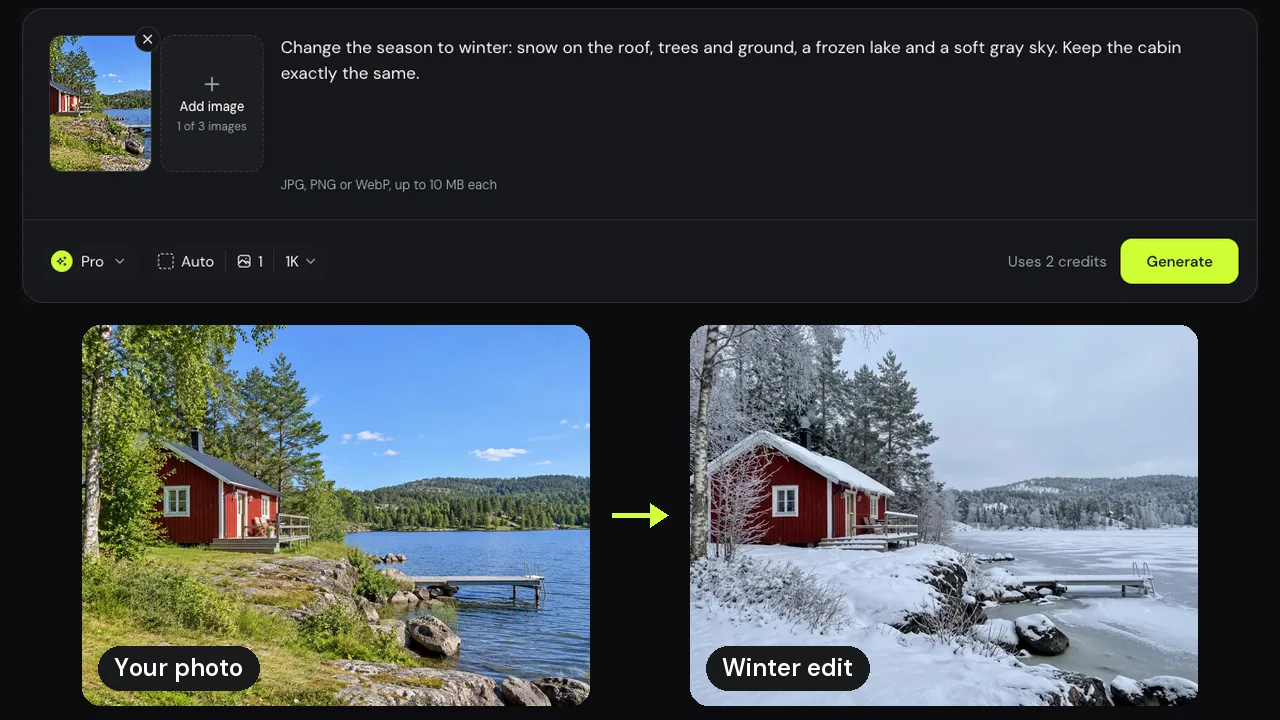
All three cards are real edit photo with AI results. Beach Background swaps what sits behind a mug, Summer to Winter changes the season, and Room Makeover restyles the furniture.
Only need a new backdrop? Use change image background. For winter scenes, add snow to photo, or open the image to image editor for a full restyle.
How it works
Edit photo with AI in 3 steps
To edit photo with AI you need one photo and one sentence: the change, and what stays.
Upload your photo
JPG, PNG or WebP up to 10 MB. Add up to two more images for an object or a style.
Type the change
Name one change, then what to keep: replace the sky with a sunset, keep the house and the people. That sentence is your edit photo with AI prompt.
Generate and compare
Pro took 25 to 44 seconds in our tests. Compare, download, or press Edit this result for the next change.
Results
What our edit photo with AI tests changed and kept
Four real results compared with their originals, pixel by pixel. Red marks what changed.
A new background, the same face
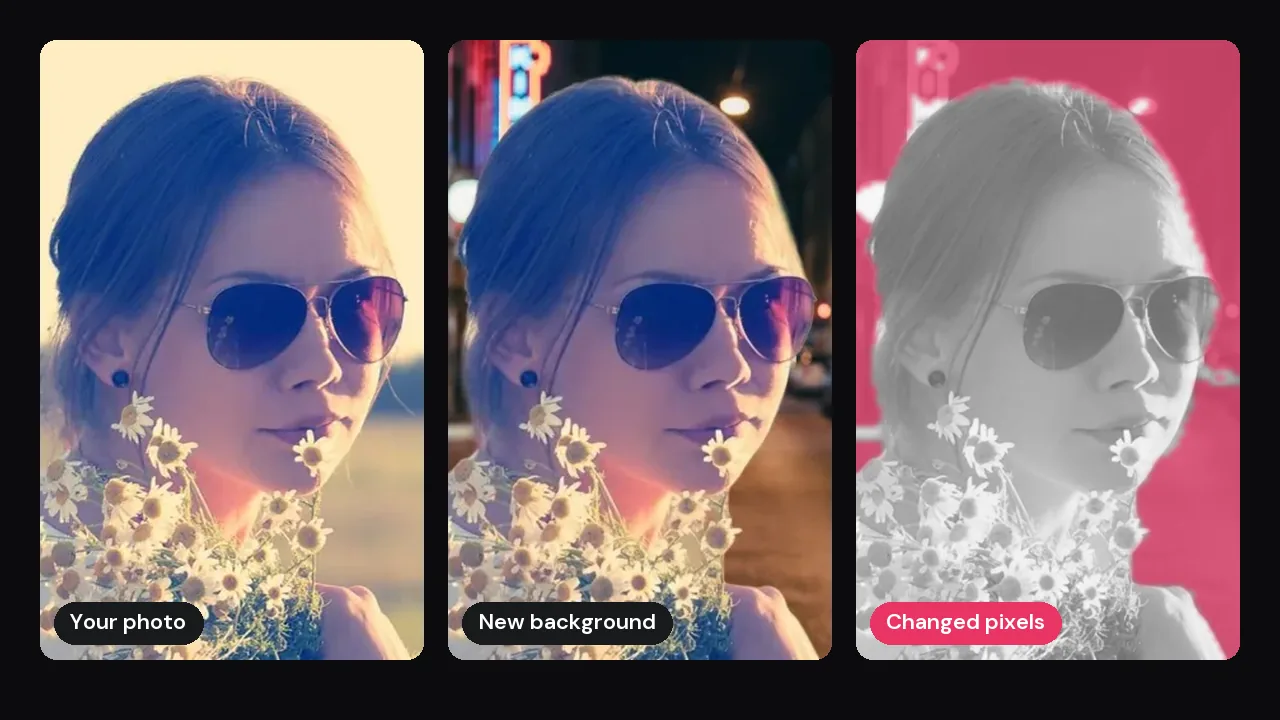
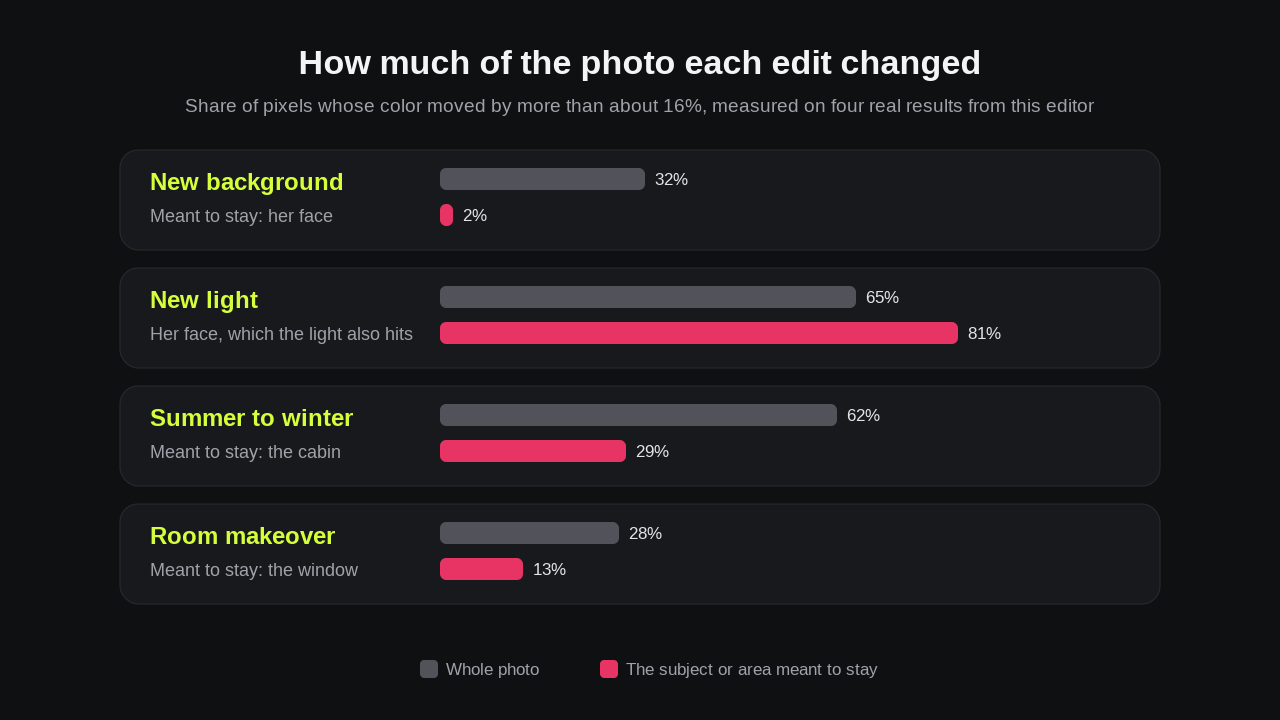
Step one of a three-step edit swapped a hazy field for a city street at night. Only 2% of the pixels across her face changed, against 98% of the strip at the top of the frame. Name only the background and the person stays put.
A season change reaches most of the frame
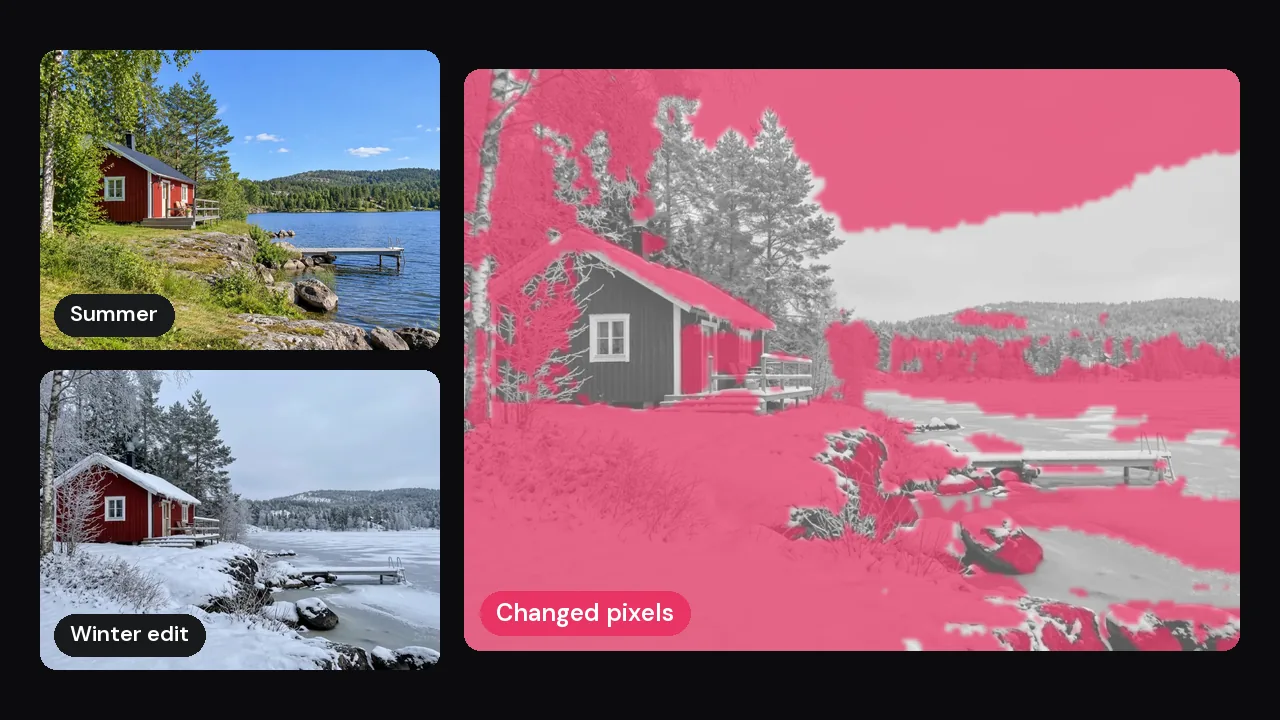
Summer to Winter changed 62% of the cabin photo, including 89% of the sky plus the lake and grass. The cabin kept its shape, windows and deck, yet 29% of its pixels moved: snow on the roof and a duller red under a gray sky. When you edit photo with AI for a season or weather, expect a big edit.
A room restyle keeps the walls
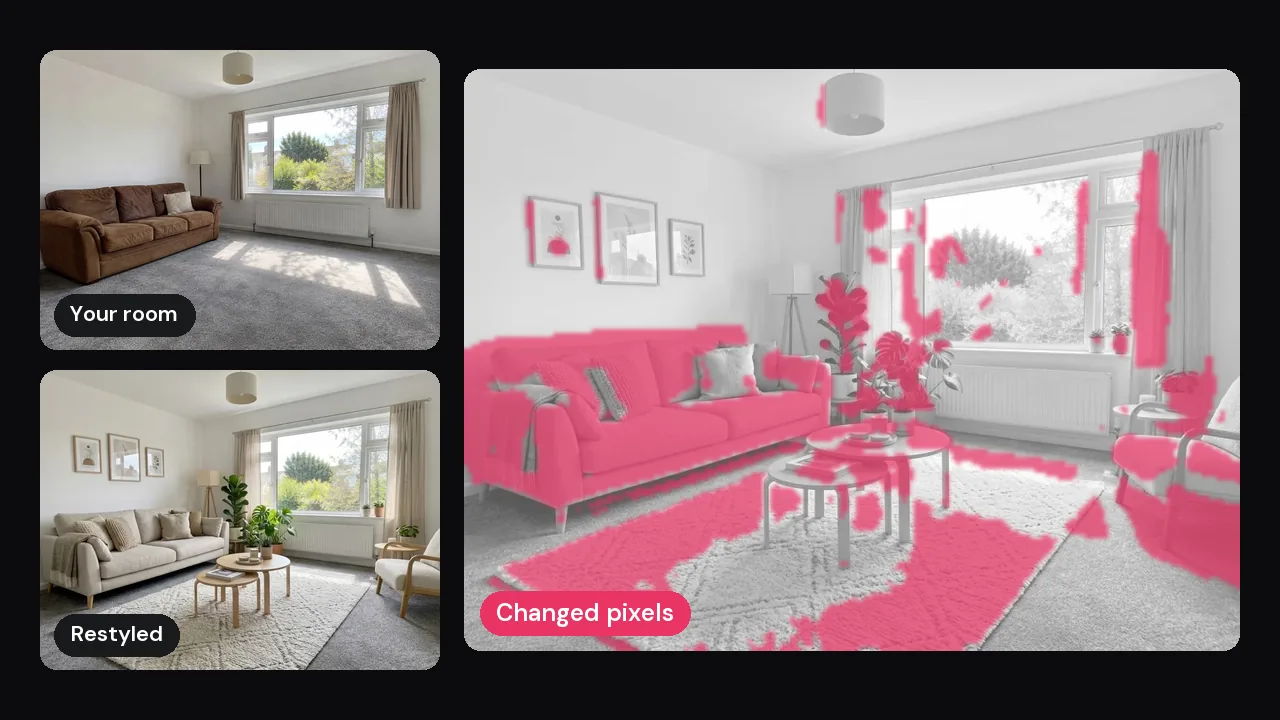
Room Makeover swapped the brown sofa, rug and lamp for a Scandinavian set and hung three prints. Only 0.4% of the ceiling pixels and 13% of the window changed, against 46% of the floor and furniture zone. Edit photo with AI, say keep the window and layout, and they stay fixed.
Light edits touch almost every pixel
Step two of the same edit relit her with warm sunset light. That moved 81% of the face pixels, because light falls on skin too, though her features stayed the same. So edit photo with AI in this order: background first, light next, style last.
Type the change into the editor
To edit photo with AI from a template, load a card. Swap in your photo, rewrite the change in plain words, keep the line about what stays, and press Generate.
Prompts
Edit photo with AI prompt ideas
Each edit photo with AI prompt names one change and what stays. The first two are close to the ones we ran.
New background
Replace the background with a city street at night. Keep the person, pose and clothes the same.
Season or weather
Change the season to winter with snow on the roof and trees. Keep the house exactly the same.
Color or clothing
Change the shirt to dark green. Keep the face, hair and background.
Light
Relight the photo with warm sunset light from the left. Keep the face and pose.
Tips
Tips to edit image with AI cleanly
A good AI photo changer result needs a clear instruction and photo.
One change per run
Edit photo with AI one step at a time: background first, then Edit this result for the light. Our face survived because each step changed one thing.
Name what stays
End each edit photo with AI prompt with keep the face, pose and layout. The room kept its window because the prompt said so.
Start large
Use your biggest original. Small or blurry photos lose hair and text detail when you edit photo with AI.
Good to know
How we tested and what to expect
Edit photo with AI results made with this editor and measured on November 24, 2026 by the Image to Image team.
Test
Four real edit photo with AI runs in Pro: new background, new light, Summer to Winter, Room Makeover. We scaled each pair to one size, blurred fine noise and counted pixels whose color moved more than about 16%.
Speed
Pro took 25 to 44 seconds in our tests; Fast about 14.
Cost
Fast uses 1 credit, Pro 2 and Pro HD 3, about $0.20, $0.40 and $0.60 with the $9.99 pack. New accounts may get 2 free credits.
Limits
Each time you edit photo with AI the picture is redrawn, so kept areas shift a little. We did not test removing objects, changing text or group photos for this page.
Privacy
Uploads and results are deleted after 7 days.
FAQ
Questions about how to edit photo with AI
Can I edit photo with AI free?
You can edit photo with AI free to start. New accounts may get 2 free credits while the daily allowance lasts, enough for one Pro edit or two in Fast. Packs start at $9.99 for 50 credits.
Will the AI edit photo tool change my face?
Only if the edit reaches it. A new background left 98% of face pixels unchanged in our test; new light changed most of them while her features stayed. Add keep the face unchanged to any edit photo with AI prompt.
Can I edit image with AI using more than one photo?
Yes. To edit photo with AI from several images, add up to three, such as your photo plus an object or a style, then say how to combine them. Three-image requests can take a little longer.
Is this an AI photo changer or a filter?
A filter puts the same look on every pixel. This editor reads your instruction, so it can change only the sky and leave the rest. Ask for a whole new style and it works as an AI image modifier too.
What should I write in an edit photo with AI prompt?
One change and what stays, in plain words. To change photo with AI, write replace the sky with a sunset, keep the house and the people.
Ready to edit photo with AI?
Upload a photo, type the change, and edit photo with AI in under a minute.